Answer naturally
Simple choices compare the kind of problems, people and work you enjoy.
Short adaptive questions connect your interests and work style with relevant IT roles, explain the result and give you a practical next step.
Try 4 questions and get a direction Free to download · Contains ads · No account required to start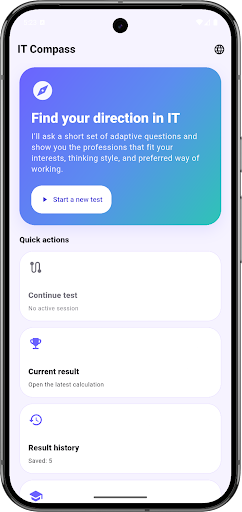
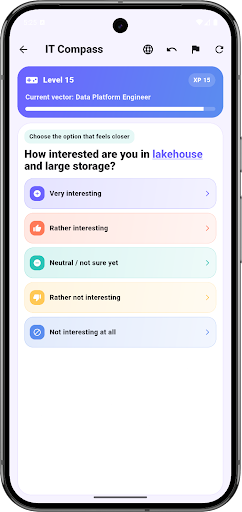
Choose what feels more natural. The preview gives you one hypothesis; the app compares more roles and explains the result. No email required.
Which outcome feels most satisfying?
The path adapts as your preferences become clearer, then turns the result into roles, explanations and an experiment you can actually try.
Simple choices compare the kind of problems, people and work you enjoy.
An interest radar makes your strongest work directions visible at a glance.
Explore matching roles across development, data, design, product, infrastructure and more.
Use the result as a starting point for learning, research or a conversation with a mentor.
A short, visual flow that ends with explanations you can use.
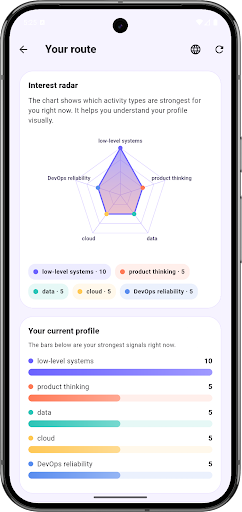
Use the result to compare ordinary tasks, run one small experiment and decide what deserves more of your time.
See what QA, analytics, design, product and support actually do.
Read guide → TRY THE WORKTurn a possible direction into four weeks of evidence.
Read guide → USE THE RESULTCompare the recommendation with one real task before committing.
Read guide →A useful guide, with honest limits.
Students, beginners, career changers and IT specialists considering a new direction.
No. It suggests several relevant directions and explains the signals behind them. It does not replace professional career counselling.
No account is required to start. Quiz progress and results are stored locally on your device.
Yes, it is free to download and contains advertising.
Quiz answers and results can stay on your device. Advertising and diagnostics services may process technical data, IP-derived approximate location and device identifiers, subject to your settings and consent. Read the IT Compass Privacy Policy.
Download IT Compass, compare possible roles and choose one small task to test first.